Kamerasteuerung für Windows 10/11 Camera control for Windows 10/11

Der richtige Shot auf jeder Kamera, wenn es live ist. The right shot on every camera, when it's live.

CamCue steuert Panasonic AW, ONVIF, VISCA und NDI von einer Oberfläche aus. Der Live-Modus lässt sich nur bewusst verlassen, ein Notstopp hält alle Bewegungen an, und nach einem Absturz stellt CamCue die Session wieder her. CamCue puts camera control and preset recall for Panasonic AW, ONVIF, VISCA and NDI on one surface. Live mode can only be left deliberately, an emergency stop halts all motion, and after a crash CamCue restores the session.

Panasonic AWONVIFVISCANDI (Studio)(Studio)Windows 10/11
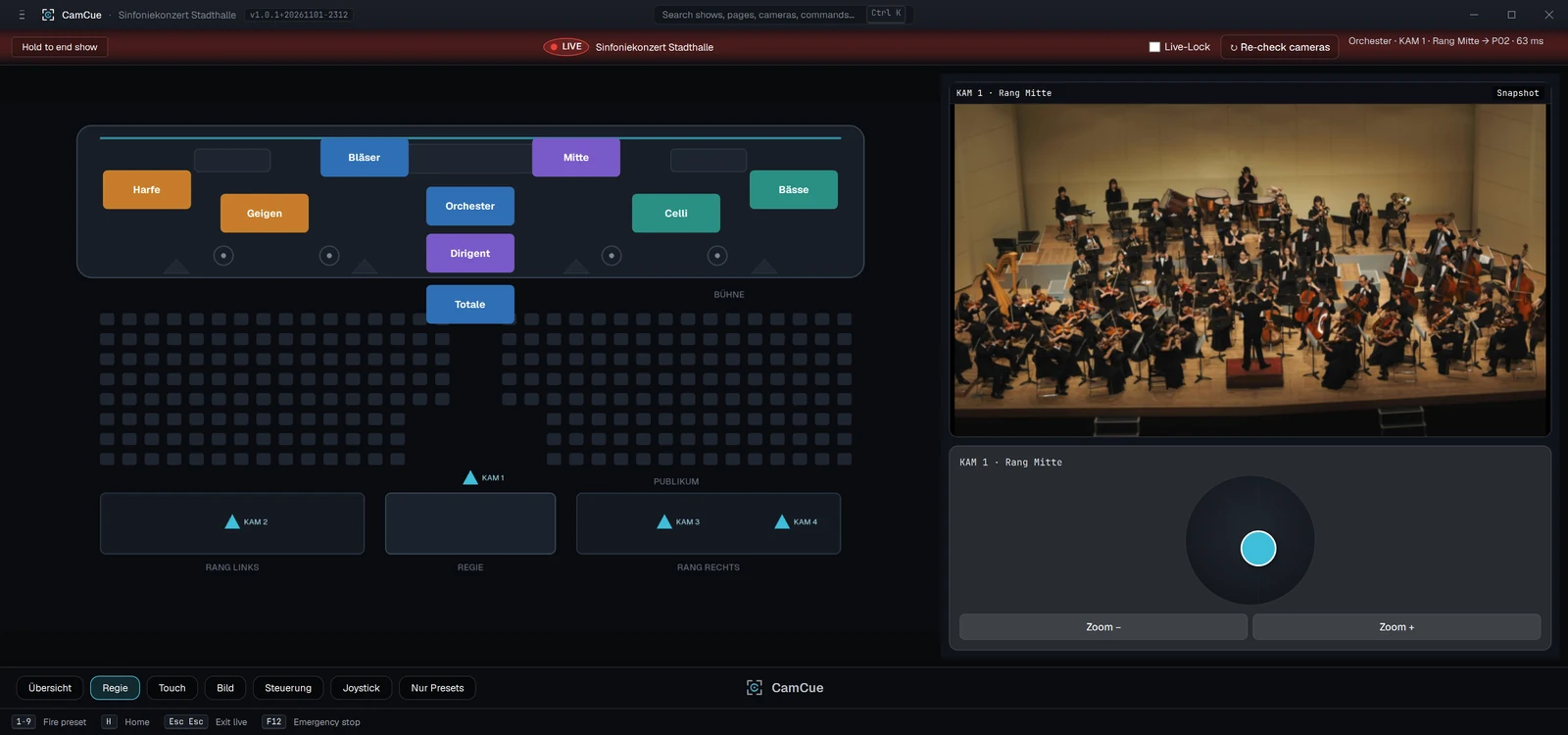
CamCue im Live-Modus, Regie-Ansicht: Bühnenplan mit Preset-Knöpfen, Kamerabild eines Orchesters und Joystick.
Bildschirmfoto der Anwendung mit Beispieldaten. Kamerabild: Beispielfoto von Unsplash.Application screenshot with sample data. Camera image: sample photo from Unsplash.
Unterstützte Protokolle Supported protocols Panasonic AW ONVIF VISCA / UDP NDI PTZ (Studio)(Studio) Windows 10/11 · x64
Für wen Who it is for

Überall, wo mehrere Kameras ruhig und wiederholbar eingestellt werden müssen.

Wherever several cameras have to be set reliably and repeatably.

Die Beispiele beschreiben mögliche Abläufe. Sie nennen keine bestehenden Kunden.

The examples describe possible workflows. They do not refer to existing customers.

Gottesdienst-Stream

Church service stream

Altar, Kanzel, Chor, Gemeinde: Jede Einstellung liegt als benanntes Preset bereit. Wer am Pult sitzt, ruft sie per Klick, Tastenkürzel oder Stream Deck ab, statt die Kameras von Hand nachzuführen.

Altar, pulpit, choir, congregation: every shot is stored as a named preset. Whoever sits at the desk recalls it with a click, a hotkey or a Stream Deck instead of moving the cameras by hand.

Hörsaal und Schule

Lecture hall and school

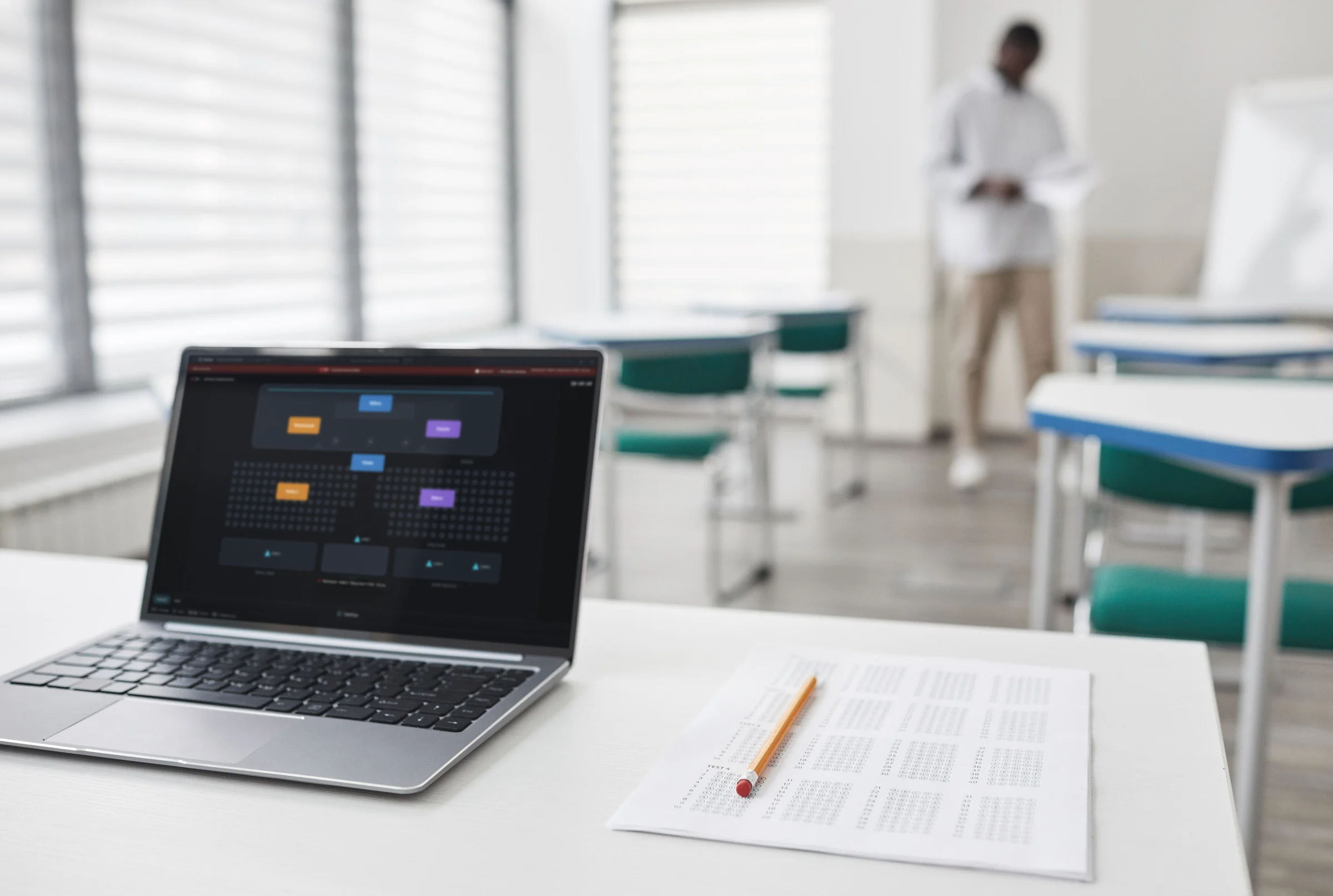
Dozentenpult, Tafel, Saal: Die festen Kamerapositionen eines Raums werden einmal als Show gespeichert. Die Show liegt als portabler Ordner vor und lässt sich auf einen anderen Rechner mitnehmen.

Lectern, board, auditorium: the fixed camera positions of a room are saved once as a show. The show is a portable folder and can be taken to another computer.

Live-Event

Live event

Bühne, Band, Publikum, Detail: Kameras verschiedener Hersteller liegen in einem Layout. Im Preview-Modus lassen sich Abrufe proben, ohne den Live-Ausgang zu berühren.

Stage, band, crowd, detail: cameras from different makers sit in one layout. In Preview mode you can rehearse recalls without touching the live output.

Konferenz

Conference

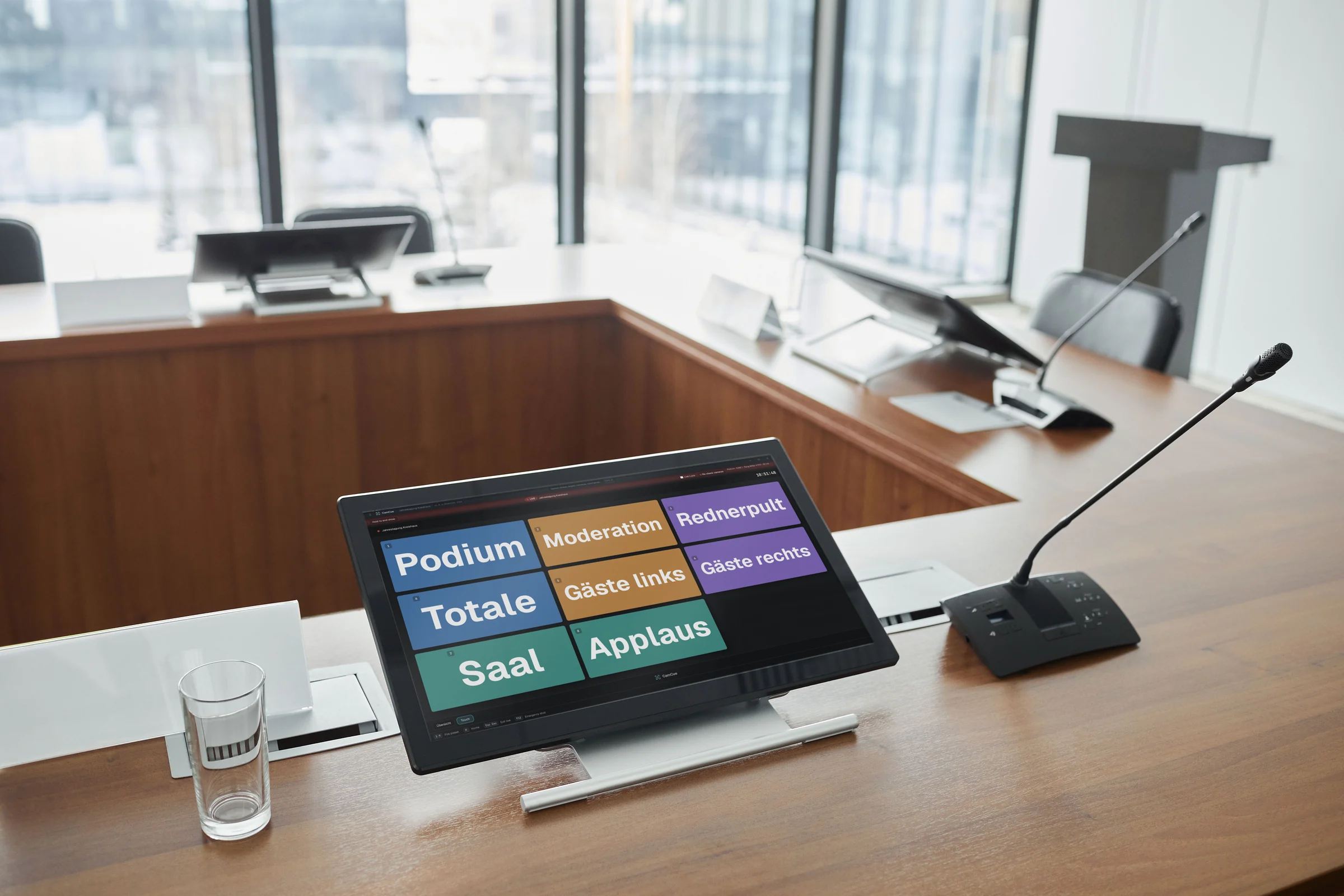
Podium, Redner, Saal: Wiederkehrende Aufbauten werden als Show gespeichert und beim nächsten Termin geöffnet. Kameraliste, Presets und Konfiguration lassen sich als PDF zur Übergabe exportieren (ab Pro).

Panel, speaker, hall: recurring setups are saved as a show and opened again at the next event. The camera list, presets and configuration can be exported as a PDF for handover (Pro and up).

Sport

Sport

Tor, Mittellinie, Bank: Die Kameraposition für jede Spielsituation wird als Preset hinterlegt und per Hotkey abgerufen.

Goal, halfway line, bench: the camera position for each game situation is stored as a preset and recalled with a hotkey.

Ihr Einsatz fehlt?

Your use case missing?

Prüfen Sie CamCue 14 Tage mit Ihren eigenen Kameras. Ob Ihr Aufbau passt, zeigt sich am schnellsten dort.

Try CamCue for 14 days with your own cameras. That is the quickest way to see whether your setup fits.

→ Test startenStart free trial
AufbauSetup

Vom Laptop bis zum Touchmonitor.

From a laptop to a touch monitor.

CamCue läuft auf einem Windows-Rechner: am Laptop, am Monitor oder an einem Touchmonitor mit der Touch-Ansicht.

CamCue runs on a Windows PC: on a laptop, a monitor or a touch monitor with the touch view.

Touchmonitor am Tagungstisch mit CamCue-Touch-Ansicht, daneben ein Mikrofon.
Konferenz: Touchmonitor am TagungstischConference: touch monitor at the table
Laptop mit CamCue-Bühnenplan auf einem Tisch in einem Unterrichtsraum.
Schule: Laptop am PultSchool: laptop at the desk
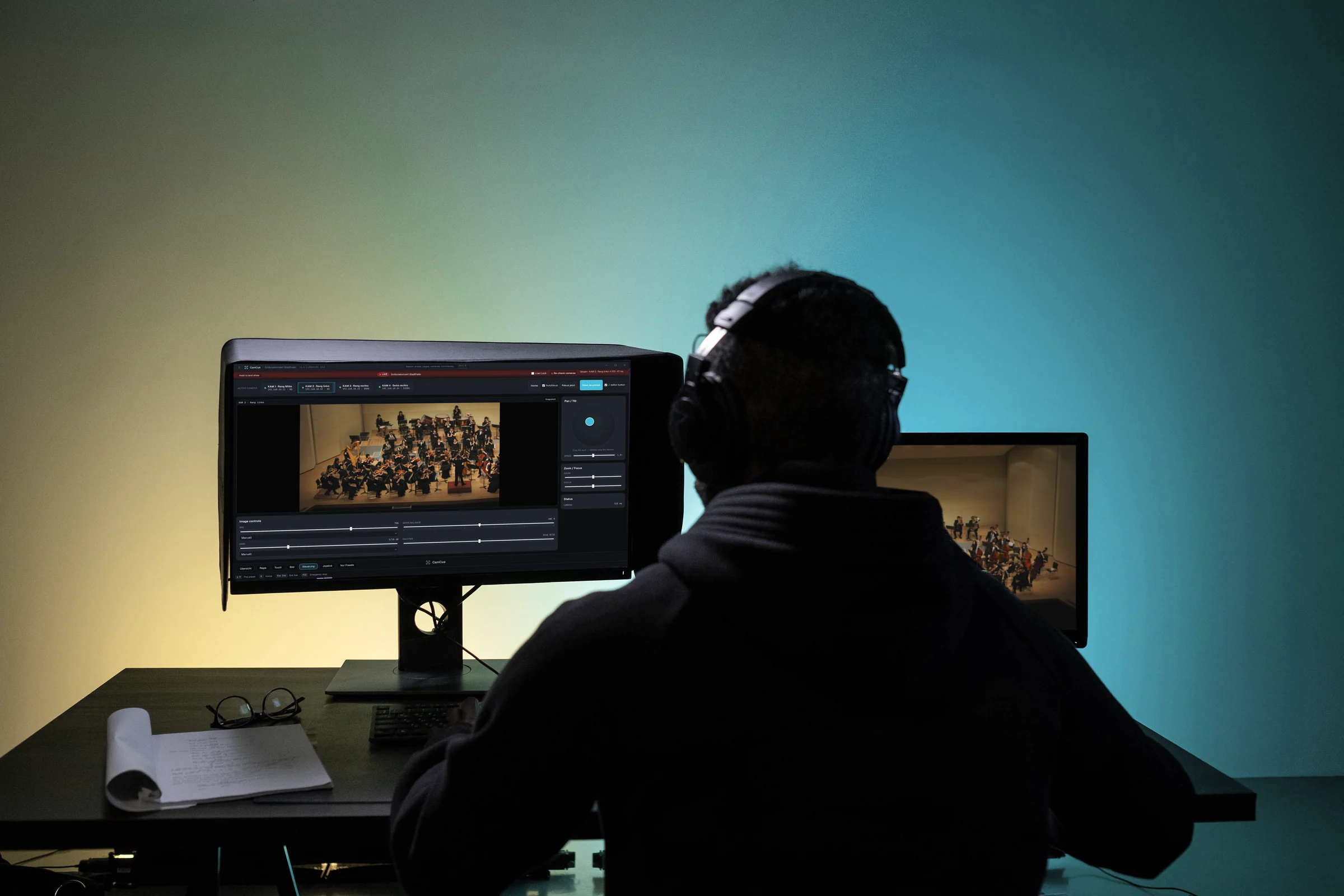
Person von hinten an einem Regieplatz mit zwei Monitoren: CamCue-Steuerseite und Kamerabild eines Orchesters.
Regieraum: zwei MonitoreControl room: two monitors

Beispielbild: Foto von Pexels, CamCue-Bildschirm nachträglich eingesetzt, Beispieldaten.Sample image: photo from Pexels, CamCue screen added afterwards, sample data.

Was CamCue ausmacht What CamCue does

Ausgelegt für den Live-Betrieb.

Designed for live operation.

Klarer Abruf

Clear recall

Große, farbcodierte Preset-Buttons, Halten-zum-Bestätigen bei kritischen Aktionen und ein Live-Modus, den Sie nur mit bewusster Bestätigung verlassen.

Big, colour-coded preset buttons, hold-to-confirm on critical actions, and a Live mode you can only leave with a deliberate confirmation.

→ MehrLearn more

Multi-Protokoll

Multi-protocol

Steuerung von Panasonic AW, ONVIF, VISCA (UDP) und NDI PTZ. Auto-Discovery pro Protokoll, damit Sie verschiedene Marken in einem Layout mischen können. Solo: ein Protokoll aus Panasonic AW, ONVIF oder VISCA. Pro: diese drei gemeinsam. Studio: zusätzlich NDI.

Control of Panasonic AW, ONVIF, VISCA (UDP) and NDI PTZ. Auto-discovery per protocol, so you can mix makes in one layout. Solo: one protocol from Panasonic AW, ONVIF or VISCA. Pro: all three together. Studio adds NDI.

→ MehrLearn more

Wiederherstellung

Recovery

Atomare Session-Snapshots auf Festplatte. Nach einem Absturz bietet CamCue beim nächsten Start an, die zuletzt gesicherte Session wiederherzustellen. Dazu kommen Health-Monitor und Diagnose-Bundle.

Atomic on-disk session snapshots. After an ungraceful exit, CamCue offers on the next start to restore the most recently saved session. There is also a health monitor and a diagnostics bundle.

→ MehrLearn more
Live-ModusLive mode

Ein Tap. Der richtige Shot.

One tap. The right shot.

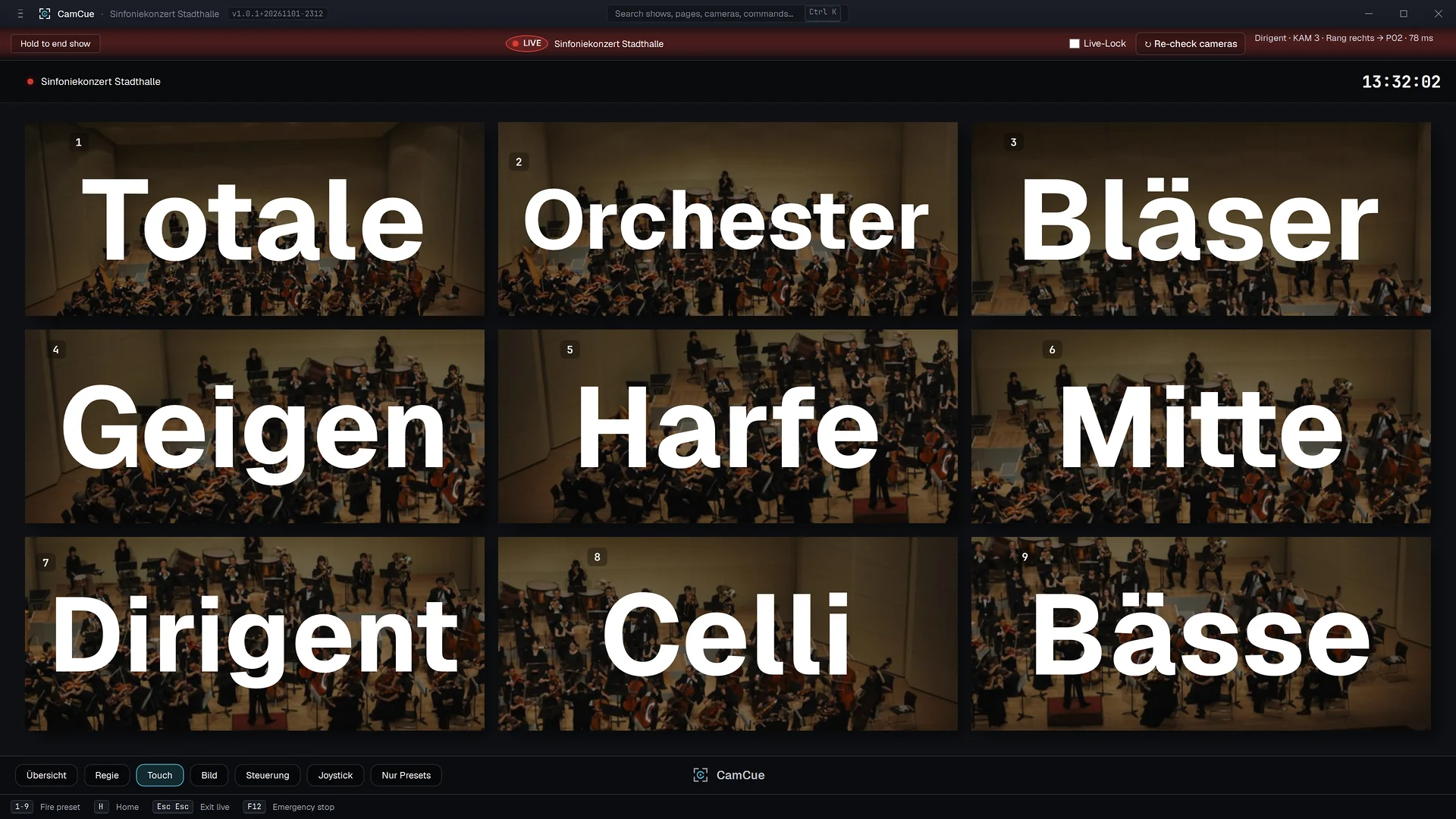
Im Live-Modus ist die Seitenleiste ausgeblendet und das Verlassen erfordert eine bewusste Bestätigung, damit niemand versehentlich aus der Show ausbricht. F12 ist der Notstopp für jede Bewegung.

In Live mode the sidebar is hidden and exiting takes a deliberate confirmation, so nobody bumps out of the show by accident. F12 stops all motion.

→ Setup / Edit / Preview / LiveSetup / Edit / Preview / Live
Live-Modus, Touch-Ansicht: neun große Preset-Kacheln mit Vorschaubild und Hotkey-Nummer.
Bildschirmfoto der Anwendung mit Beispieldaten. Kamerabild: Beispielfoto von Unsplash.Application screenshot with sample data. Camera image: sample photo from Unsplash.
Kamera-DiscoveryCamera discovery

Verschiedene Marken in einem Layout.

Mix makes in one layout.

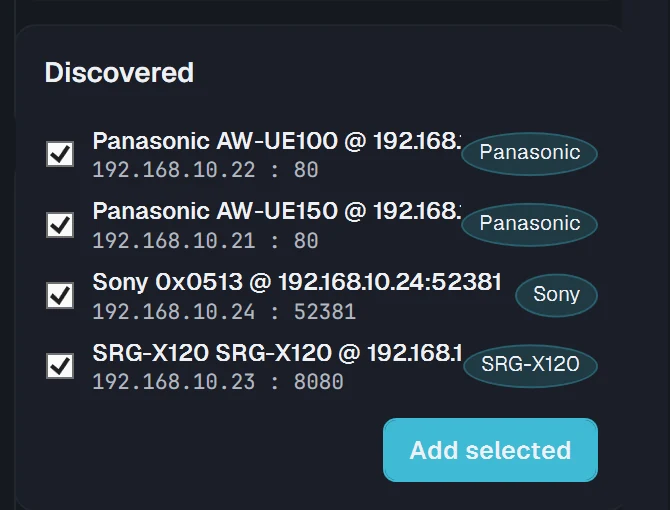
Auto-Discovery pro Protokoll: Panasonic HTTP-Discovery, ONVIF WS-Discovery, VISCA-UDP-Probe und NDI mDNS. Kameras registrieren, benennen und steuern, egal von welchem Hersteller. NDI ist in Studio enthalten.

Auto-discovery per protocol: Panasonic HTTP discovery, ONVIF WS-Discovery, VISCA UDP probe and NDI mDNS. Register, name and drive the cameras, regardless of make. NDI is included in Studio.

→ Protokolle & DiscoveryProtocols & discovery
Gefundene Kameras der Netzwerksuche: Panasonic AW-UE150, AW-UE100, ONVIF-Kamera SRG-X120 und VISCA-Kamera von Sony.
Bildschirmfoto der Anwendung mit Beispieldaten.Application screenshot with sample data.
DiagnoseDiagnostics

Probleme früh sehen.

See problems early.

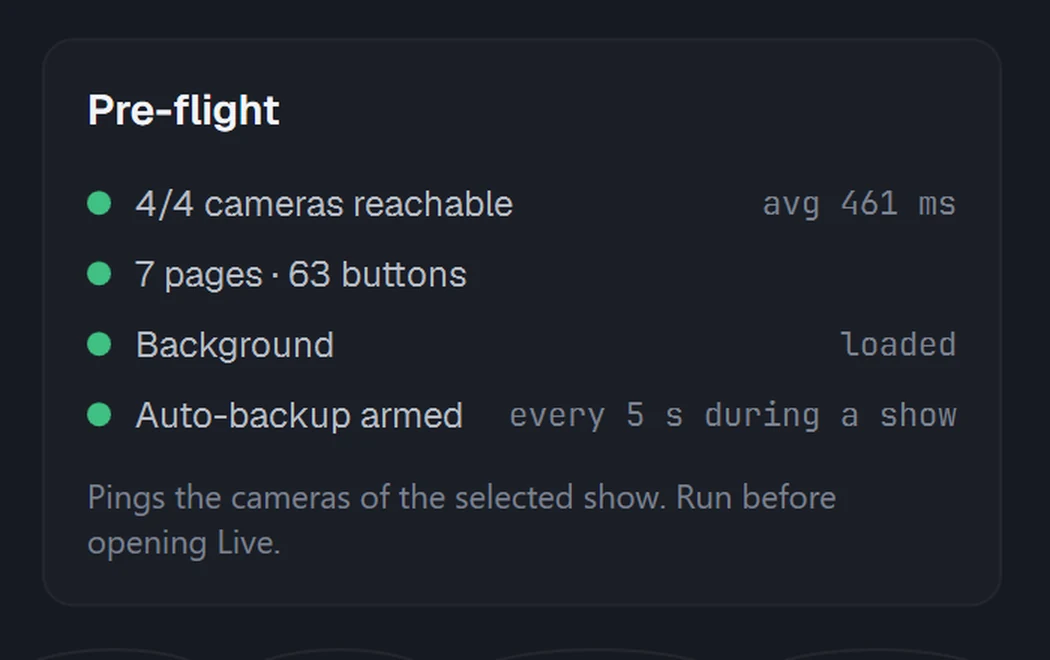
Health-Monitor, Latenz-Tracking, Retry-Queue mit Resilienz-Banner, Fehler-Reporting und ein Ein-Klick-Diagnose-Bundle für den Support.

Health monitor, latency tracking, a retry queue with a resilience banner, error reporting and a one-click diagnostics bundle for support.

→ Diagnose & ResilienzDiagnostics & resilience
Vorab-Prüfung: 4 von 4 Kameras erreichbar, Seiten und Knöpfe, Hintergrund, automatische Sicherung.
Bildschirmfoto der Anwendung mit Beispieldaten.Application screenshot with sample data.
Lizenz im Live-Betrieb Licence in live operation

Zuverlässig im Live-Betrieb: Was bei Offline, Serverausfall und Ablauf passiert.

Dependable in live operation: what happens when offline, when the server is down and when a licence ends.

Bis zu 60 Tage offline

Up to 60 days offline

CamCue prüft die Lizenz beim Start lokal. Zwischen zwei erfolgreichen Online-Prüfungen dürfen bis zu 60 Tage vergehen. Die Kamerasteuerung braucht keine Verbindung zum Lizenzserver.

CamCue checks the licence locally at startup. Up to 60 days can pass between two successful online checks. Controlling the cameras needs no connection to the licence server.

Lizenzserver nicht erreichbar

Licence server unreachable

Ein kurzer Ausfall oder fehlendes Internet stoppt CamCue nicht. Es arbeitet mit der zuletzt bestätigten Lizenz weiter, solange deren Gültigkeit nicht abgelaufen ist. Eine fällige Prüfung unterbricht keine laufende Show, sie wird erst beim nächsten Start eingefordert.

A short outage or missing internet does not stop CamCue. It keeps working with the most recently confirmed licence for as long as that confirmation has not expired. A pending check does not interrupt a show in progress; it is only enforced on the next start.

Nach Ablauf oder Kündigung

After expiry or cancellation

Mit dem Ende des bezahlten Zeitraums endet das Recht zur Nutzung. Der kostenlose Test endet nach 14 Tagen ohne Kosten und ohne automatische Verlängerung. Kündigen können Sie ohne Anmeldung.

When the paid period ends, the right to use CamCue ends. The free trial ends after 14 days at no cost and without automatic renewal. You can cancel without signing in.

→ Häufige Fragen zu Lizenz, Offline-Betrieb und KündigungFrequently asked questions on licensing, offline use and cancellation

Steuerflächen Control surfaces

Bedienung per Tastatur, Stream Deck und MIDI.

Operate with keyboard, Stream Deck and MIDI.

Tastatur-Hotkeys

Keyboard hotkeys

Hotkeys pro Button, solange das CamCue-Fenster aktiv ist. Einen systemweiten Hook gibt es bewusst nicht.

Hotkeys per button while the CamCue window is in focus. There is deliberately no system-wide hook.

Stream Deck

Elgato Stream Deck direkt über USB, ohne zusätzliches Plugin (nur Studio).

Elgato Stream Deck directly over USB, without an extra plugin (Studio only).

MIDI

MIDI-Geräte und Controller: Pro Button wird eine Note hinterlegt (nur Studio).

MIDI devices and controllers: one note is assigned per button (Studio only).

Einordnung In context

Warum CamCue statt einer eigenen Lösung?

Why CamCue instead of a home-built solution?

Ein Layout für mehrere Protokolle

One layout for several protocols

Skripte, Makros und Oberflächen einzelner Hersteller decken häufig nur eine Kameramarke ab. CamCue bringt Panasonic AW, ONVIF, VISCA und NDI in einer Oberfläche zusammen.

Scripts, macros and vendor interfaces often cover only one camera make. CamCue brings Panasonic AW, ONVIF, VISCA and NDI together on one surface.

Betriebssicherheit schon eingebaut

Operational safeguards built in

Bewusstes Verlassen des Live-Modus, Notstopp, Wiederherstellung der Session und Diagnose-Bundle müssten Sie bei einer Eigenentwicklung selbst bauen und testen.

A deliberate exit from Live mode, an emergency stop, session recovery and a diagnostics bundle are things you would have to build and test yourself in a home-built tool.

Pflege und Ansprechpartner

Maintenance and a contact person

Fehlerbehebung und Weiterentwicklung liegen beim Hersteller. Bei Fragen schreiben Sie an den Support, statt die Lösung intern zu warten.

Bug fixing and further development are handled by the maker. If you have questions, you write to support instead of maintaining the solution in house.

Kosten im Vergleich

Cost in comparison

CamCue kostet ab €399 pro Seat und Jahr inkl. USt. Stellen Sie dem den Aufwand für Entwicklung, Test und Pflege einer eigenen Lösung gegenüber. Wer nur eine Kameramarke einsetzt, kommt mit der Software des Herstellers oder mit kostenlosen Werkzeugen unter Umständen aus.

CamCue costs from €399 per seat and year incl. VAT. Compare that with the effort of developing, testing and maintaining your own solution. If you only use one camera make, the maker's software or free tools may be enough.

Kompatibilität Compatibility

Welche Kameras sich steuern lassen.

Which cameras you can control.

ProtokollProtocolKameras (Auszug)Cameras (excerpt)
Panasonic HTTP/CGIPanasonic AW-HE-Serie (z. B. AW-HE40, AW-HE130) und AW-UE-Serie (z. B. AW-UE40, AW-UE100, AW-UE150)Panasonic AW-HE series (e.g. AW-HE40, AW-HE130) and AW-UE series (e.g. AW-UE40, AW-UE100, AW-UE150)
VISCA over IPSony SRG-Serie, PTZOptics, BirdDog, Marshall, AIDA und weitere VISCA-konforme KamerasSony SRG series, PTZOptics, BirdDog, Marshall, AIDA and other VISCA compliant cameras
ONVIF Profile SPTZ-Kameras mit ONVIF Profile S, z. B. Hikvision, Dahua, UniviewPTZ cameras with ONVIF Profile S, e.g. Hikvision, Dahua, Uniview
NDI PTZNDI-PTZ-Kameras, z. B. PTZOptics, BirdDogNDI PTZ cameras, e.g. PTZOptics, BirdDog

Angaben nach der Protokoll-Dokumentation. Ob ein einzelnes Modell alle Funktionen unterstützt, hängt von seiner Protokollunterstützung ab; prüfen Sie Ihre Kameras am besten im 14-Tage-Test. Ports, Anmeldung und Modelle im Detail Based on the protocol documentation. Whether a single model supports every function depends on how it implements the protocol; the best way to check your cameras is the 14 day trial. Ports, login and models in detail

In BewegungIn motion

CamCue in 37 Sekunden.

CamCue in 37 seconds.

Vom Bühnenplan bis zur Wiederherstellung: So wechseln die Ansichten im Einsatz. Das Video läuft ohne Ton.

From the stage plan to recovery: how the views change in use. The video has no sound.

Bildschirmaufnahmen mit Beispieldaten, Mauszeiger und Zooms nachträglich ergänzt. Kamerabild: Beispielfoto von Unsplash.Screen recordings with sample data, pointer and zooms added afterwards. Camera image: sample photo from Unsplash.
PreisePricing

Jahreslizenz, pro Seat. Kostenloser Test.

Annual licence, per seat. Free trial.

Drei Editionen: Solo, Pro und Studio, ab €399 pro Seat und Jahr. Den kostenlosen Test gibt es für jede Edition, vorausgewählt ist Pro. Preise inkl. USt für Verbraucher; die Nettopreise für Unternehmen und die Mengenstaffel stehen auf der Preisseite.

Three editions: Solo, Pro and Studio, from €399 per seat and year. The free trial is available for every edition, with Pro preselected. Prices incl. VAT for consumers; net prices for businesses and the volume discount are on the pricing page.

Für den Live-EinsatzFor live use

Bauen Sie das Layout einmal und rufen Sie es bei jeder Sendung wieder ab.

Build the layout once and recall it for every broadcast.

Fragen vorab? Über das Kontaktformular oder im FAQ. Antwort in der Regel innerhalb von 1 bis 2 Werktagen. Questions first? Use the contact form or the FAQ. We usually reply within 1 to 2 business days.